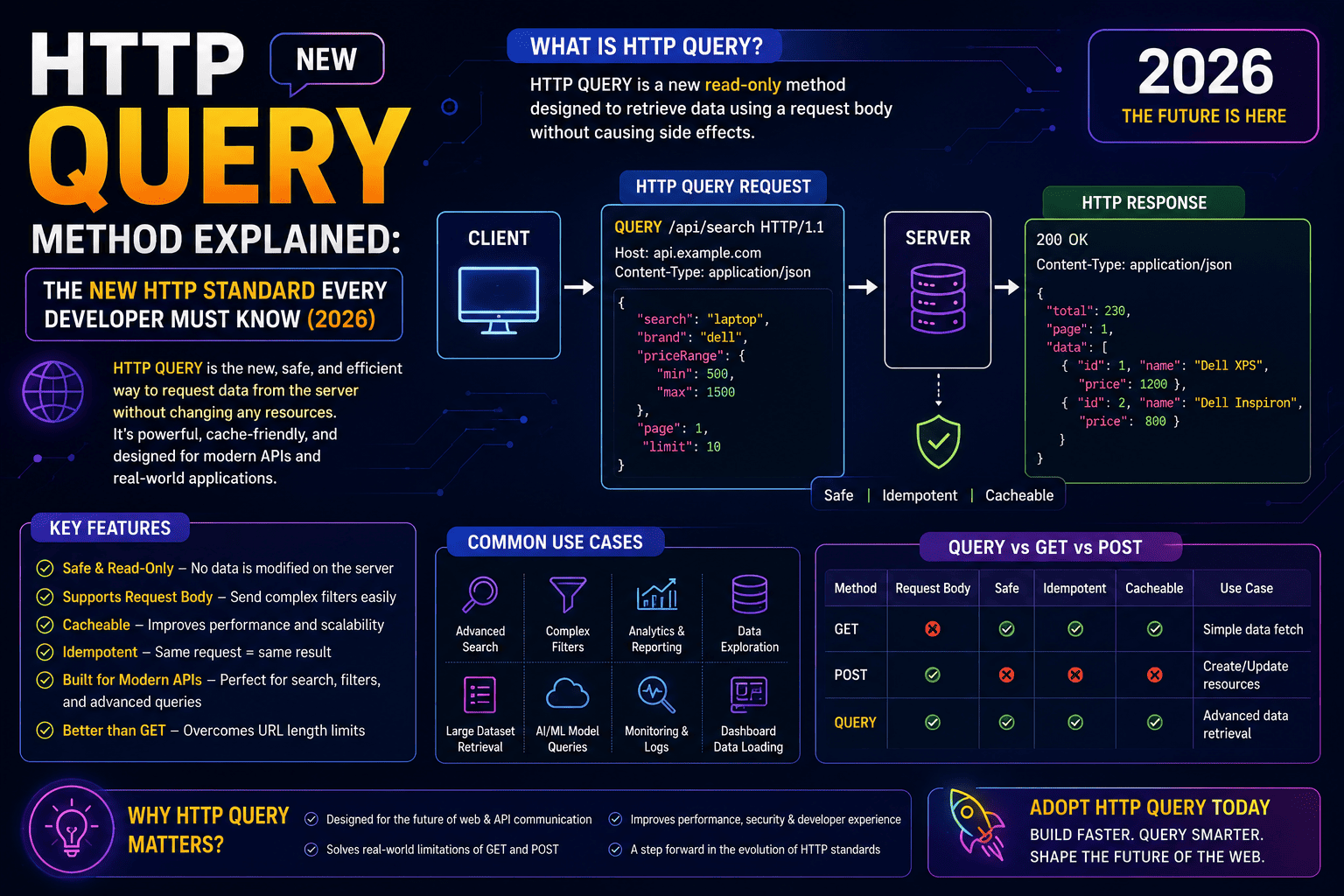
HTTP QUERY Method Explained: The New HTTP Standard Every Developer Must Know (2026)
The web has relied on the same core HTTP methods for decades. Developers have built APIs using GET, POST, PUT, PATCH, and DELETE. However, modern applications often need to send complex search filters while still treating the request as safe and cacheable. This is where the HTTP QUERY method comes in.
The proposed HTTP QUERY method is designed to solve a long-standing problem: how to perform complex queries without misusing GET or POST. Instead of forcing large filter objects into URLs or using POST for read-only operations, QUERY introduces a cleaner, more semantically correct approach.
✔ Proposed by the IETF HTTP Working Group
✔ Intended for read-only operations with a request body
✔ Supports complex search criteria
✔ Can be cache-friendly depending on implementation
✔ Improves API design and HTTP semantics
Table of Contents
- What is the HTTP QUERY Method?
- Why Was QUERY Introduced?
- Problems with GET Requests
- Problems with POST Requests
- How QUERY Solves These Issues
- QUERY vs GET vs POST
- Real API Examples
- Advantages
- Limitations
- Browser Support
- Future of HTTP APIs
- Frequently Asked Questions
What is the HTTP QUERY Method?
The HTTP QUERY method is a proposed addition to the HTTP protocol that allows clients to send a request body for read-only queries. Unlike POST, QUERY does not imply that server data will change. Unlike GET, it is designed to carry complex request payloads without encoding everything into the URL.
Think of it as a method specifically designed for advanced search, filtering, reporting, analytics, and other operations where the client needs to send structured query data but does not intend to create, update, or delete resources.
Why Was a New HTTP Method Needed?
Traditional HTTP methods work well for many scenarios, but modern APIs frequently require sending large and structured search criteria. Developers often face two imperfect choices:
- Use GET and place all parameters in the URL.
- Use POST even though the request is only reading data.
Both approaches have drawbacks. URLs have practical length limits and become difficult to read when filters are complex. Using POST for read-only operations also hides the true intent of the request.
Problems with GET Requests
| Problem | Explanation |
|---|---|
| Long URLs | Complex filters create unreadable URLs. |
| URL Length Limits | Browsers, servers, and proxies may reject very long URLs. |
| Nested Objects | Complex JSON structures don't fit naturally into query strings. |
| Security | Sensitive query parameters may appear in logs and browser history. |
Problems with POST Requests
Many APIs use POST for searches simply because POST allows a request body. However, POST generally represents an operation that may change server state.
- Semantically incorrect for read-only operations
- Harder for caches to optimize
- Less descriptive API design
- Confusing documentation
- Reduced interoperability
How HTTP QUERY Solves These Problems
The QUERY method combines the strengths of GET and POST:
- Supports JSON request bodies.
- Represents a read-only operation.
- Allows complex filters.
- Keeps URLs clean.
- Improves API semantics.
- Can work with caching strategies.
- Product search
- Reporting dashboards
- Analytics APIs
- Document search
- AI search engines
- Vector database search
- Enterprise filtering
- Graph-style APIs
HTTP QUERY vs GET vs POST
| Feature | GET | POST | QUERY |
|---|---|---|---|
| Request Body | No (by convention) | Yes | Yes |
| Read Only | Yes | Not necessarily | Yes |
| Complex Filters | Poor | Good | Excellent |
| REST Semantics | Excellent | Can be misleading | Excellent |
Example API Request
QUERY /products HTTP/1.1
Content-Type: application/json

{
  "category":"Laptop",
  "brand":["Dell","HP"],
  "price":{
      "min":50000,
      "max":100000
  },
  "availability":"In Stock"
}
Instead of constructing a very long query string, the client sends a structured JSON payload while clearly indicating that the operation is only retrieving data.
Advantages of HTTP QUERY
- Cleaner API design
- Better developer experience
- Supports complex JSON payloads
- Read-only semantics
- Potential caching benefits
- Ideal for enterprise APIs
- Improved documentation
- Modern REST architecture
Current Limitations
- Still an emerging HTTP standard.
- Browser and framework support is evolving.
- Many existing libraries do not yet expose QUERY as a first-class method.
- API gateways, proxies, and tooling may require updates.
Should Developers Start Using QUERY?
For production systems, most developers should continue using the HTTP methods supported by their frameworks and infrastructure. However, understanding QUERY is valuable because it represents the direction of modern API design. As tooling matures, QUERY could become an attractive option for complex, read-only operations.
Frequently Asked Questions
Is HTTP QUERY replacing GET?
No. GET remains the preferred method for simple resource retrieval. QUERY is intended for more complex read-only requests that benefit from a request body.
Can QUERY have a request body?
Yes. Supporting a structured request body is one of its main purposes.
Is QUERY safe?
It is designed for safe, read-only operations, meaning it should not modify server state.
Should I replace POST search endpoints today?
Not necessarily. Until QUERY is widely supported across your stack, POST may remain the practical choice for complex searches.
Conclusion
The proposed HTTP QUERY method addresses a real gap in the HTTP ecosystem by providing a dedicated way to perform complex, read-only queries with a request body. It offers clearer semantics than using POST for searches and avoids the limitations of oversized GET URLs. While adoption is still developing, it reflects the ongoing evolution of web standards and is a concept every backend and API developer should understand as the web platform continues to mature.